How to Choose a Guitar Amp Simulator: Plugin vs. Hardware
How to choose a guitar amp simulator: modeling vs. profiling, plugins vs. floor and rack units, IRs, and home recording setup, comparing Neural DSP and Kemper.
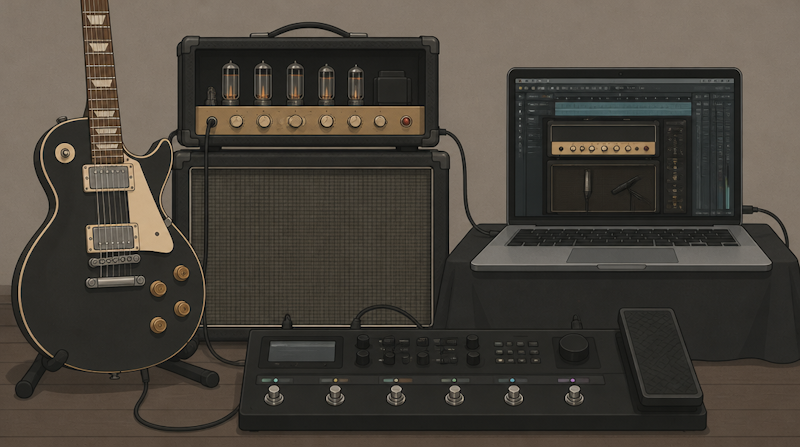
A guitar amp simulator recreates the sound of a tube amplifier and a speaker cabinet in the digital domain. Because you can plug straight into your DAW and record at any volume, amp sims have become the default way to track electric guitar at home. They also raise a familiar set of questions: should you buy a plugin or a hardware unit, what is the real difference between modeling and profiling, and how should you compare Neural DSP, Kemper, Line 6 and the rest?
This guide explains how to choose a guitar amp simulator along two axes: how the tone is produced (circuit modeling vs. profiling/capture) and what form the product takes (plugin, floor unit or rack unit). Product specifications are limited to what each manufacturer states on its official pages. Rather than ranking products by taste, the goal is to show which points actually matter when you compare them.
What Is a Guitar Amp Simulator? How It Works and the Main Approaches
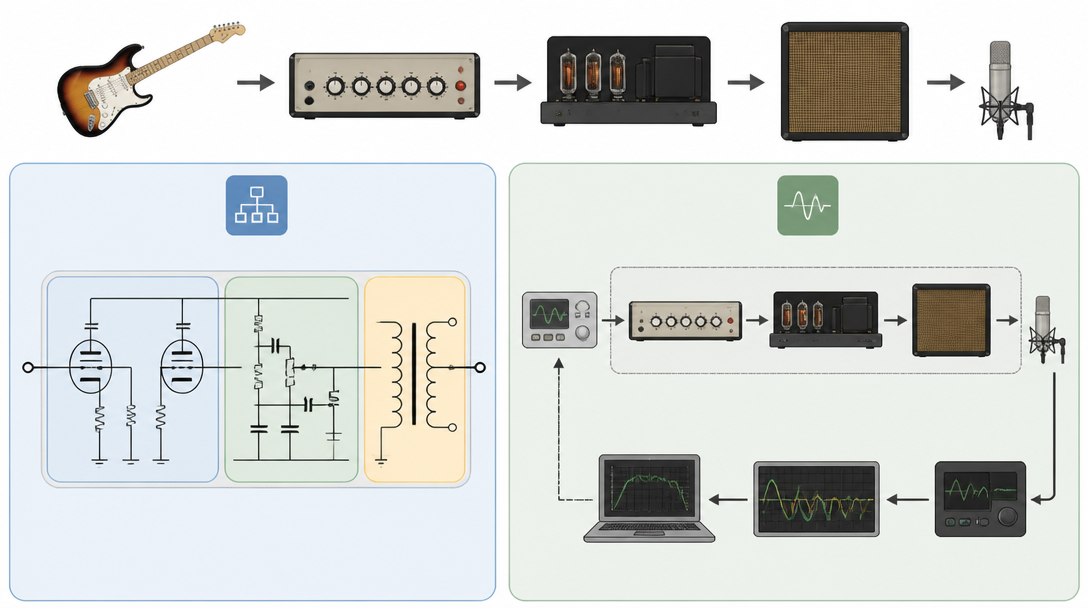
The four stages an amp simulator recreates
An electric guitar tone is not created by the guitar alone. A miked amp sound passes through roughly four stages before it reaches your recording, and a guitar amp simulator replaces that chain with digital signal processing (DSP).
- Preamp: where most of the gain and character come from, including the gain control and the tone stack (EQ)
- Power amp: the stage that drives the speaker, which affects compression and harmonic content at higher volumes
- Speaker cabinet: the speaker and the box, which cut a lot of high end and shape the familiar guitar frequency range
- Microphone and room: the mic type, its placement and the acoustics of the room all end up in the final sound
Products differ in how much of this chain they recreate and how they do it. That is what we mean by the "approach" of an amp sim.
Approach 1: circuit modeling
Circuit modeling rebuilds the circuitry of a real amplifier in software and calculates how components such as tubes, tone stacks and transformers behave. Fractal Audio, for example, describes its "Cygnus" amp modeling on the official Axe-Fx III page, with separate modeling of the preamp and the power amp. Line 6 promotes its own "HX Modeling" technology on the official Helix page.
The strength of modeling is that the virtual amp responds like the original when you turn the gain or EQ knobs. Because every amp is included as a full circuit, you have a lot of freedom to dial in different settings from scratch.
Approach 2: profiling and capture
Profiling (or capturing) sends a test signal through a real amp, analyzes the difference between the input and the output, and stores a snapshot of that particular setting. On its PROFILING technology page, Kemper explains that it analyzes the complete signal chain, from the guitar input through the amplifier to the microphone output, and saves the result as a "PROFILE."
In recent years, capture systems based on machine learning (neural networks) have become common. Neural DSP's "Neural Capture" in the Quad Cortex, IK Multimedia's "AI Machine Modeling" in TONEX and the open-source "Neural Amp Modeler (NAM)" are the best-known examples. What they share is the ability to turn your own amps and pedals into portable data.
Modeling vs. capture compared
The table below summarizes the two approaches. Neither is simply "better"; the right choice depends on what you value most.
Point of comparison | Circuit modeling | Profiling / capture |
|---|---|---|
How the tone is recreated | Calculates the behavior of the circuit | Analyzes the input and output of a real rig |
Knob response | Tends to react like the original amp | Based on the captured setting; each maker handles knob behavior differently (e.g. Kemper's "Liquid Profiling") |
Recreating your own amp | Only the models included in the product | You can capture your own amps and pedals |
Typical examples | Line 6 Helix, Fractal Axe-Fx III | Kemper, Neural Capture (Quad Cortex), TONEX, NAM |
The line between the two is getting thinner. Kemper describes Liquid Profiling as a way to make "Gain and EQ" respond exactly like the original amplifier, and products such as the Quad Cortex offer both modeling and capture in a single unit.
Cabinet Simulation and Impulse Responses (IRs)
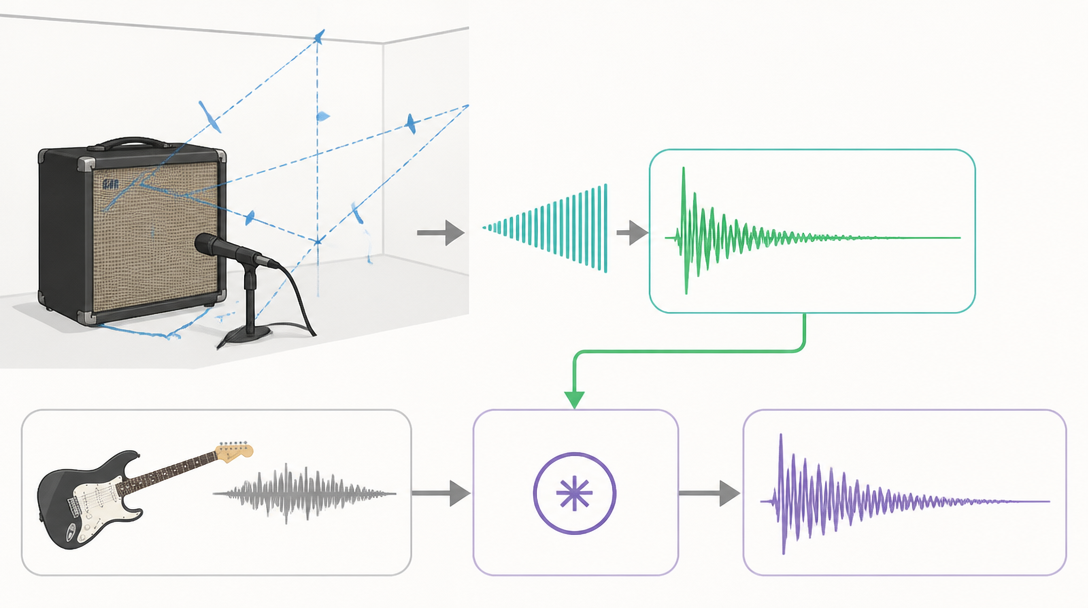
What is an impulse response?
The speaker cabinet stage has a huge effect on how an amp sim sounds, and most products today handle it with impulse responses (IRs). Premier Guitar's guide to IRs defines an impulse response as a system's output when it is presented with a very short input signal, called an impulse.
In practice, a test signal is played through a cabinet, recorded with a microphone, and the response is saved as a file. The amp simulator then applies this IR to your guitar signal through a mathematical process called convolution, which gives the dry amp signal the character of the miked cabinet.
What an IR contains: speaker, mic and room
According to the same article, a cabinet IR captures the frequency and phase response, phase cancellation between multiple speakers, edge reflections and other audible signatures of the whole recording chain. Because the mic, the mic preamp and the room are recorded along with the speaker, two IRs of the same model of cabinet can sound very different.
- The speaker and the cabinet design (open back, closed back and so on)
- The microphone type and its distance and angle from the center of the cone
- The sound of the room where the IR was captured
If you like the amount of distortion but the tone sounds muffled or harsh, the IR is often the culprit rather than the amp model. You can also shape the high end with EQ at the mixing stage; the basics are covered in our guide to using EQ and compression in a mixdown.
Check whether third-party IRs are supported
When you compare products, check whether you can load external IR files. This makes it much easier to expand your tonal options later. Line 6 states on the Helix page that third-party impulse responses can be loaded. Fractal Audio's Axe-Fx III comes with more than 2,200 factory IRs plus 2,048 "User Cab" memories, and includes a built-in utility for capturing your own speaker tones.
Plugin vs. Hardware: Choosing by Form Factor
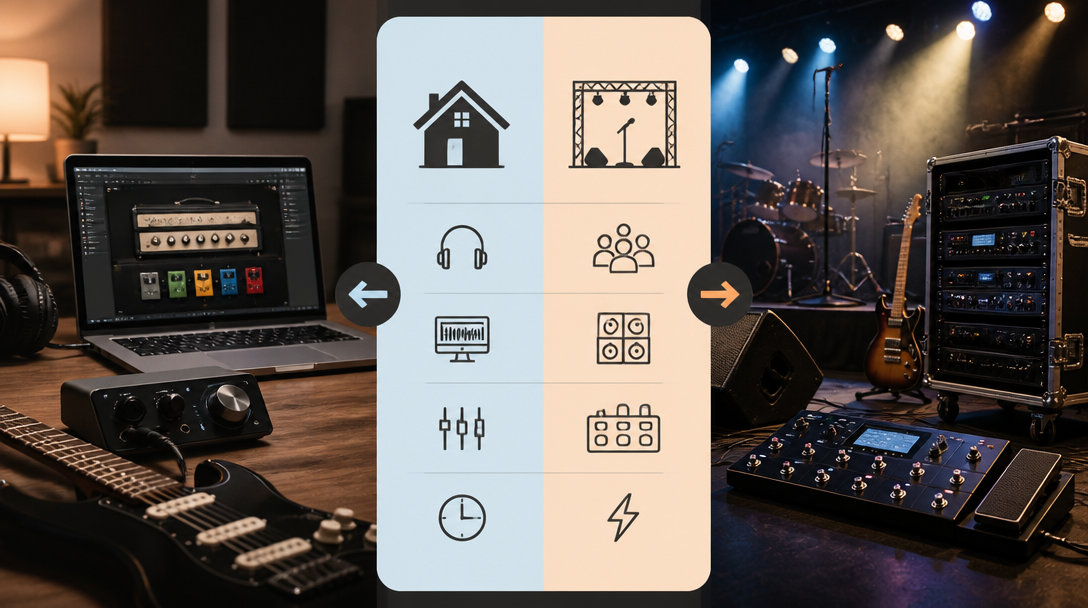
Plugins: everything stays inside your DAW
A plugin amp simulator is inserted as an effect on a DAW track. All you need is a computer and an audio interface, and the biggest advantage is that you can swap amps and IRs after the performance has been recorded.
- Neural DSP: offers the artist-designed "Archetype" series and suites based on real amplifiers (see the Neural DSP plugin lineup)
- Line 6 Helix Native: brings the same models as the Helix hardware into your DAW. The official page lists a 15-day free trial and preset compatibility with Helix hardware in both directions
- IK Multimedia TONEX: available as a standalone app and as VST 3, AAX and Audio Units plugins; even the free CS edition includes 120 Tone Models (official TONEX page)
- Neural Amp Modeler (NAM): a free, open-source project; you load trained ".nam" files into the plugin
With plugins, pay attention to which formats your DAW supports (VST3, AU or AAX). If you are still deciding on a DAW, our guide to choosing a DAW compares the major options.
Floor and rack units: the same tone on stage
Hardware amp simulators come in two broad forms: floor units that sit at your feet, and rack (or head) units. Their main advantages are that you can play live without bringing a computer and that dedicated DSP keeps the processing stable.
- Neural DSP Quad Cortex: a floor unit with a 7-inch touchscreen. The official page lists 90+ amp models, 100+ effects, 1,000+ impulse responses and a weight of 1.95 kg
- Kemper PROFILER: available in several forms, including Head, Rack, the floor-based Stage and the compact Player
- Line 6 Helix: a lineup that includes Helix Floor, Helix LT and Helix Rack
- Fractal Audio Axe-Fx III: the company's rackmount flagship
Many hardware units also work as USB audio interfaces, so you can record into your DAW directly. The Axe-Fx III, for instance, provides 16 channels of USB audio (8 in, 8 out).
Plugin vs. hardware comparison
Point of comparison | Plugin | Floor / rack unit (hardware) |
|---|---|---|
What you need | Computer + DAW + audio interface | Works on its own (connect a computer to record) |
What does the processing | Your computer's CPU | Dedicated DSP inside the unit |
Changing the tone after recording | Easy | Possible if you record a DI signal at the same time |
Live use | Requires bringing a computer | A core strength |
Typical entry cost | Relatively low (free options exist) | Requires buying the unit |
Comparing Popular Guitar Amp Simulators: Neural DSP, Kemper, Line 6 and More
Neural DSP (Quad Cortex and plugins)
Neural DSP makes both plugins and hardware. The Quad Cortex page describes Neural Capture as technology that learns and replicates the sonic characteristics of physical amplifiers, overdrives and cabinets. Version 1 runs on the device itself, while version 2 uses cloud processing to aim for higher-resolution captures. The plugin lineup also shows that some plugins are compatible with Quad Cortex and Quad Cortex mini through your account.
Kemper (PROFILER)
Kemper established profiling as a category. According to its official explanation, the latest "PROFILING 2.0" analyzes more than 100,000 individual frequency points and is available for PROFILER MK2 models through the free OS 14.0 update. It is the approach players typically consider when they want to take the exact sound of their own tube amp on the road.
Line 6 Helix and Fractal Audio Axe-Fx III
Line 6 and Fractal Audio are the leading examples of circuit modeling. Line 6 lists 112 amp models, 274 effects and 87 cabinets for Helix, along with 12 microphone types that can be positioned at various distances from the speaker. Fractal Audio lists more than 290 amp types for the Axe-Fx III.
IK Multimedia TONEX and Neural Amp Modeler
TONEX is an ecosystem in which "Tone Models" created with AI Machine Modeling can be used across software and pedal hardware such as TONEX ONE and TONEX Pedal. Through the ToneNET community, you can download Tone Models shared by other users. Neural Amp Modeler is an open-source project that uses deep learning to model amps and pedals, and its GitHub repository is released under the MIT license. The official site notes that companies including Darkglass, Two Notes and Hotone have integrated NAM technology into their products.
Product / maker | Main approach | Form | Key features stated officially |
|---|---|---|---|
Neural DSP Quad Cortex | Modeling + Neural Capture | Floor unit | 90+ amps, 100+ effects, 1,000+ IRs, 7-inch touchscreen |
Neural DSP plugins | Modeling | Plugin | Archetype series and more; some usable on Quad Cortex |
Kemper PROFILER | Profiling | Head / rack / floor | PROFILING 2.0 (100,000+ frequency points analyzed), Liquid Profiling |
Line 6 Helix / Helix Native | Modeling (HX Modeling) | Floor / rack / plugin | 112 amps, 274 effects, 87 cabs, third-party IR support |
Fractal Audio Axe-Fx III | Modeling (Cygnus) | Rack | 290+ amps, 2,200+ factory IRs, USB audio 8 in / 8 out |
IK Multimedia TONEX | AI capture | Plugin / pedal | VST 3 / AAX / AU, free CS edition, sharing via ToneNET |
Neural Amp Modeler | AI capture | Plugin (open source) | Free, MIT license |
Model counts are based on each manufacturer's official pages as of October 2026. They change with updates, so check the latest information before you buy.
Setting Up a Guitar Amp Simulator for Home Recording
Plug into a Hi-Z (instrument) input or use a DI
When you use a plugin, connect your guitar to the Hi-Z (instrument) input on your audio interface, because passive pickups are designed to see a high-impedance load. Sound On Sound points out that connecting a guitar to a line input may give you better levels, but "the tonality and playability will suffer badly." If the instrument input clips, the article recommends engaging the pad switch, or running the guitar through an external active DI box into a mic input.
Whether an interface has a Hi-Z input is an important buying criterion. See our guide to choosing an audio interface for home recording for details.
Adjust buffer size and latency
With plugins, latency, the delay between playing a note and hearing it, becomes an issue. Sound On Sound's advice on buffer size explains the trade-off: a smaller buffer reduces latency but increases CPU load, while a larger buffer eases the load but makes the delay more noticeable.
- When recording: set the buffer as small as your system allows without clicks and pops
- When mixing: raise the buffer as you add more plugins to keep playback stable
- While tracking, bypass heavy plugins: use lighter reverb settings, or add them after recording
Hardware units process the signal on their own DSP, so you can monitor without depending on your DAW's buffer setting. For how your monitoring setup (headphones or speakers) changes what you hear, see the pitfalls of mixing on headphones.
Record a DI track and re-amp later
A standard practice with amp sims is to record the dry DI signal at the same time as the processed sound. Sound On Sound's guide to re-amping describes recording the guitar completely dry by direct injection and then routing that track out of the DAW into an amp later on.
With a plugin, you simply insert the simulator on the DI track and can change amps or IRs during the mix. With hardware, check the number of USB audio channels (the Axe-Fx III, for example, offers 8 in and 8 out) and confirm in the specifications whether you can record the processed signal and the DI signal on separate tracks, so you can build the same workflow.
How to Choose a Guitar Amp Simulator for Your Use Case
If you mostly record and write in a DAW
If recording and mixing are your main goals, starting with a plugin makes the most sense. There are several ways to try before you buy, including the free TONEX CS edition, Neural Amp Modeler, and the 15-day Helix Native trial. Tone preferences depend heavily on your setup, so testing with your own guitar, interface and monitors reduces the risk of a bad purchase.
If you want the same tone live and in the studio
If you also play live, a floor unit is the natural candidate. Check whether it can share presets with a plugin version. Helix Native and Helix hardware exchange presets in both directions, and Neural DSP lets you use some of its plugins on the Quad Cortex. Being able to take a tone you built at home straight to the stage has a direct impact on the efficiency of your whole workflow.
If you want to preserve the sound of your own amp
If you already own a tube amp or pedals you love, look at products that support capture or profiling. Kemper, the Quad Cortex (Neural Capture), TONEX and NAM are all designed around capturing your own gear. Keep in mind that capturing requires an environment where you can actually run your amp, cabinet and microphone.
Pre-purchase checklist
- Is your main use home recording, live performance or both?
- Do you want a large library of amps (modeling) or a faithful copy of your own gear (capture)?
- Does it come in a plugin format your DAW supports (VST3, AU or AAX)?
- Can it load third-party IRs?
- Does your audio interface have a Hi-Z input (if not, use a DI box)?
- Is there a free edition or trial you can test first?
Once your guitar tone is in place, time-based effects add depth to the finished track. Our guide to using reverb and delay explains how to apply them to guitars.
Summary
- A guitar amp simulator digitally recreates four stages: preamp, power amp, cabinet, and mic/room
- There are two main approaches: circuit modeling (Helix, Axe-Fx III) and profiling/capture (Kemper, Neural Capture, TONEX, NAM)
- Much of the cabinet sound comes from the impulse response, so check whether third-party IRs are supported
- Choose a plugin for home recording, a floor unit if you also play live, and a capture-capable product if you want to preserve your own amp
- When recording, use a Hi-Z input (or a DI) with a sensible buffer setting, and record a DI track so you can change the tone later
For examples of finished productions, you can listen to Daito's released tracks on the major streaming services.