MIDI Explained: Essential Guide for DAW Beginners
Learn what MIDI is, how it works, and how to use it in your DAW. Covers MIDI messages, USB vs DIN vs Bluetooth, CC numbers, and MIDI 2.0 explained clearly.
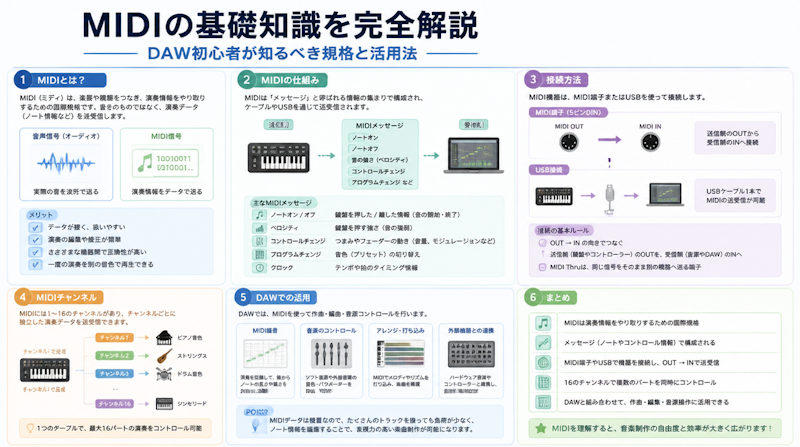
When starting out in music production, one term appears absolutely everywhere: MIDI. Open any DAW and you'll encounter MIDI tracks, MIDI keyboards, and MIDI channels at every turn. Yet despite how ubiquitous the term is, a surprising number of beginners never develop a clear understanding of what MIDI actually is or how it works. Building that understanding makes a genuine difference — DAW operations become more intuitive, creative decisions become more deliberate, and the entire production process becomes smoother.
This guide covers everything a beginner needs to know about MIDI: its definition and history, how MIDI messages work, the differences between connection types, practical DAW workflows, and what the arrival of MIDI 2.0 means for modern music production.
What Is MIDI? Core Definition and How It Works
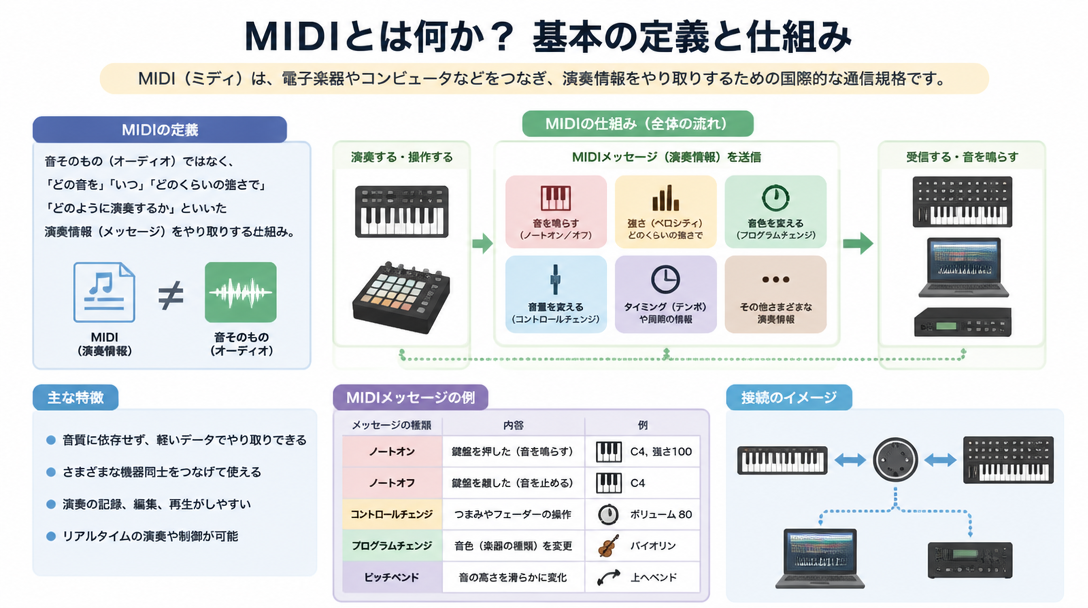
MIDI Is a Digital Language for Performance Data
MIDI (Musical Instruments Digital Interface) is a universal communication standard that allows electronic instruments, computers, and audio equipment to exchange performance information. The concept was first proposed by American engineer Dave Smith in 1981, and the specification was formally ratified as an international standard in 1983. From the very beginning, MIDI was designed as an open standard — any manufacturer could implement it, which is a key reason it spread so rapidly across the industry.
The most important thing to understand about MIDI is that it transmits performance instructions, not sound itself. When a key is pressed on a MIDI keyboard, the instrument doesn't send audio — it sends a message that says, in effect, "play note C4 at a velocity of 90." A separate sound source — whether a hardware synthesizer, a software instrument inside a DAW, or a sample library — receives that instruction and generates the actual audio. MIDI is the messenger; the sound engine is the one that speaks.
Without MIDI, electronic instruments from different manufacturers would be unable to communicate. MIDI established a shared language that allowed a Roland keyboard to trigger a Yamaha synthesizer, or a DAW running on a laptop to control a hardware drum machine across the room. That cross-platform, cross-manufacturer compatibility remains the foundation of modern music production.
Why MIDI Has Stayed Relevant for Over 40 Years
Few technology standards survive four decades of rapid technological change without becoming obsolete. MIDI has. Introduced in 1983, it remains a daily tool for virtually every electronic musician and producer on the planet. The primary reason is backward compatibility: a modern DAW can communicate seamlessly with a synthesizer built in 1985, because both speak the same fundamental protocol.
The physical connectors have evolved — from the original 5-pin DIN ports to USB, and now to Bluetooth — but the underlying MIDI protocol running through those connections has remained essentially unchanged. A USB MIDI cable carries the same MIDI data as a DIN cable; only the physical transport layer is different. This consistency means that the knowledge and equipment investments musicians made decades ago are still valid today, and that any new MIDI-compatible product integrates immediately into an existing setup.
MIDI vs. Audio: Understanding the Critical Difference
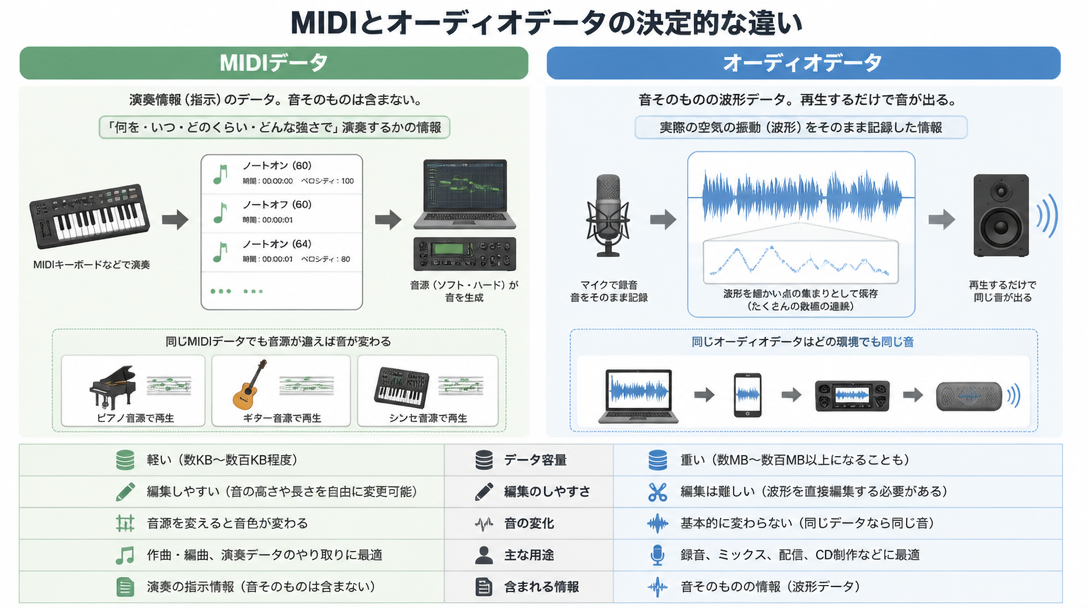
MIDI Is Instructions; Audio Is Sound
Every DAW presents two fundamental track types: MIDI tracks and audio tracks. Understanding the difference between them is one of the most important conceptual leaps a beginner can make, because these two data types behave in fundamentally different ways.
Category | MIDI Data | Audio Data |
|---|---|---|
What it contains | Performance instructions (notes, velocity, timing) | Recorded sound waveforms |
Common file formats | .mid / .midi | .wav / .mp3 / .aiff |
File size | Very small (a few KB to tens of KB) | Large (several MB to hundreds of MB) |
Editability | Freely editable (pitch, tempo, velocity, timbre) | Requires waveform editing tools |
Sound source dependency | Requires a sound source to produce audio | Plays back independently |
Primary use | Programming software instruments, sequencing | Recording live performances, using loops |
An audio file is a recording — a snapshot of sound waves at a specific moment. Play it back and you hear exactly what was captured. A MIDI file, by contrast, contains no sound at all. It's a set of instructions waiting to be interpreted by a sound source. The same MIDI file played through a grand piano plugin sounds like a grand piano; route it through an analog synth patch and it becomes something entirely different.
The Unmatched Flexibility of MIDI Editing
The defining advantage of MIDI over recorded audio is its non-destructive, infinitely flexible editability. When a guitarist records a live take and the pitch is slightly off, correcting it in the audio domain involves pitch-shifting algorithms that can degrade audio quality. With MIDI, changing the pitch of any note is as simple as dragging it up or down in the piano roll — there is no quality loss, because no audio is being processed. The instruction is just updated.
The same logic applies to tempo, timing, and velocity. A MIDI performance recorded at 90 BPM can be stretched to 140 BPM with no artifacts. Every note can be moved to a precise grid position, or deliberately shifted off the grid to create a more human feel. Velocities can be sculpted note by note to shape the dynamics of a phrase.
Perhaps most powerfully, the sound source can be changed entirely after the performance is captured. A full orchestral arrangement programmed using a basic piano sound can be reassigned to high-quality string, brass, and woodwind libraries with a few clicks. The performance data stays the same; only the instrument that interprets it changes. This separation of performance from timbre is uniquely MIDI, and it gives composers and producers a level of flexibility that is simply impossible with recorded audio.
Types of MIDI Messages and How They Work
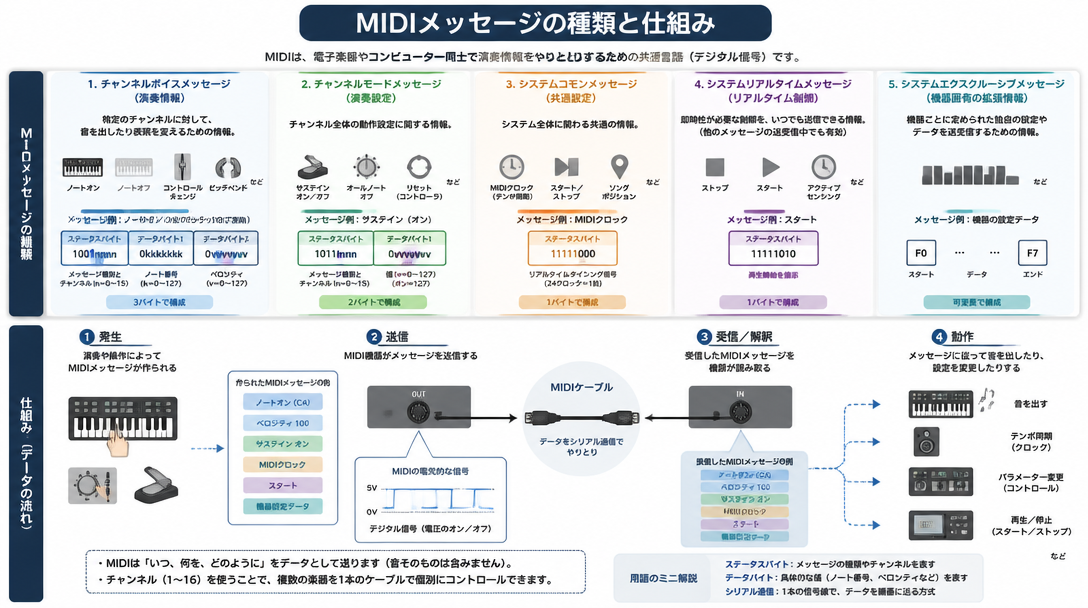
Note On and Note Off: Triggering and Releasing Sounds
The most fundamental MIDI messages are Note On and Note Off. Together, they describe every note that is played and released in a MIDI performance.
- Note On: Sent the moment a key is pressed. Contains two key pieces of information — the note number (which pitch to play) and the velocity (how hard the key was struck).
- Note Off: Sent the moment the key is released. Tells the sound source to stop sustaining that note.
- Note Number: A value from 0 to 127 representing the pitch. Middle C is note number 60. Each integer step represents one semitone.
- Velocity: A value from 0 to 127 representing how quickly (and therefore how forcefully) the key was pressed. Higher velocities typically produce louder, brighter sounds; lower velocities produce softer, more muted tones. The exact response depends on how the sound source is programmed.
In a DAW's piano roll editor, every visible note block represents the time span between a Note On and its corresponding Note Off message. The horizontal length of the block on the timeline corresponds to how long the note is held, while its vertical position on the keyboard grid represents its pitch. Adjusting either property in the piano roll directly modifies the underlying MIDI data.
Control Change (CC) Messages: Adding Expression and Control
Control Change messages (CC) handle everything beyond the basic triggering of notes. Where Note On/Off defines what is played, CC messages define how it is played — the expressive nuances, articulations, and real-time parameter changes that bring a MIDI performance to life. There are 128 CC numbers (0–127), each assigned to a specific type of control. The most commonly used ones in music production include:
CC Number | Function | Common Use |
|---|---|---|
CC #1 | Modulation Wheel | Adding vibrato depth to strings or synths |
CC #7 | Channel Volume | Automating overall volume of a track |
CC #10 | Pan (Stereo Position) | Placing instruments in the stereo field |
CC #11 | Expression | Real-time dynamic shaping (crescendo/decrescendo) |
CC #64 | Sustain Pedal (Damper) | Emulating a piano's sustain pedal |
CC #91 | Reverb Send Level | Adjusting the amount of reverb applied |
CC #93 | Chorus Send Level | Adjusting the amount of chorus effect |
In practice, CC messages are indispensable for realistic orchestral programming. A violin section that plays every note at the same volume sounds robotic; drawing in CC #11 (Expression) data in the piano roll to shape the dynamic arc of a phrase — swelling through a climax and tapering off at the end — transforms it into something that actually sounds like an ensemble performing with intention. Similarly, automating CC #1 (Modulation) on a sustained string note can gradually introduce vibrato in a musically natural way.
Most MIDI keyboards include a modulation wheel and a pitch bend wheel that transmit CC #1 and pitch bend data respectively in real time. Many also feature assignable knobs and sliders that can be mapped to any CC number, making them powerful real-time controllers for software instruments and DAW parameters.
Program Change, Pitch Bend, and Other MIDI Messages
Beyond notes and control changes, several other MIDI message types play important roles in music production:
- Program Change (PC): Switches the active preset or patch on a sound source. Under the General MIDI standard, PC #1 calls up a grand piano, PC #41 triggers a violin, and so on. This allows a single MIDI file to specify which instruments should be used across all tracks.
- Pitch Bend: A continuous message that smoothly raises or lowers the pitch of notes currently playing. Unlike note numbers (which move in discrete semitone steps), pitch bend is a smooth, continuous transition — essential for emulating guitar bends, slide techniques, or the expressive glides of a synthesizer. It is controlled by the pitch bend wheel on most MIDI keyboards.
- Aftertouch: Generated when additional pressure is applied to a key after it has been struck. Channel Aftertouch affects all notes on a channel simultaneously; Polyphonic Aftertouch (supported on fewer instruments) tracks each key independently. Common applications include adding vibrato or a subtle volume swell in response to playing intensity.
- System Messages: A category of messages that apply globally rather than to a specific channel. MIDI Clock is the most widely used system message — it transmits tempo pulses that allow multiple devices (drum machines, sequencers, DAWs) to stay locked in sync with each other.
Understanding MIDI Channels
Controlling Multiple Instruments Over a Single Connection
One of MIDI's most practical features is its channel system. A single MIDI connection can carry up to 16 independent channels simultaneously, with each channel capable of transmitting a completely different set of performance data. In a typical setup, each channel might be assigned to a different instrument — channel 1 for piano, channel 2 for bass, channel 10 for drums, and so on. All of this data travels over the same cable or connection, and each sound source listens only to the channel it has been assigned to receive.
Inside a DAW, MIDI channels are managed per-track. Each MIDI track is typically assigned to output on a specific channel, and the software instrument or hardware synthesizer receiving that output is configured to respond only to that channel. When working with multiple hardware synthesizers connected through a MIDI interface, assigning them to different receive channels prevents crosstalk — ensuring that the drum machine doesn't accidentally respond to the piano's MIDI data.
General MIDI: A Standardized Sound Set
General MIDI (GM) is an extension of the MIDI standard ratified in 1991. While the base MIDI spec defines how performance data is transmitted, it says nothing about what sounds a device must produce. General MIDI solves this by mandating a specific set of 128 instruments and mapping them to fixed Program Change numbers. PC #1 is always a grand piano, PC #33 is always an acoustic bass, and PC #57 is always a trumpet — on any GM-compliant sound source.
This standardization means that a Standard MIDI File (SMF) created on one device will play back with the correct instrumentation on any other GM-compliant device, making it ideal for sharing musical ideas across different setups and platforms.
One important rule to remember: MIDI channel 10 is reserved exclusively for drums and percussion under the GM standard. Any note data sent to channel 10 triggers drum sounds rather than melodic instruments, regardless of what Program Change has been sent. This is a consistent convention across all GM implementations and should be kept in mind when working with GM-compatible instruments or Standard MIDI Files. For more on choosing and setting up DAW software, see the guide on DAW selection and setup fundamentals.
MIDI Connection Types: DIN, USB, and Bluetooth
DIN MIDI (5-Pin): The Original Standard
The original physical MIDI connection uses a circular 5-pin DIN connector, the same format introduced when the standard launched in 1983. These connectors appear in three port variants on MIDI-equipped hardware:
- MIDI OUT: Transmits MIDI data generated by the device to an external receiver.
- MIDI IN: Receives incoming MIDI data from an external source.
- MIDI THRU: Passes through any data arriving at the MIDI IN port, allowing multiple devices to be chained in series without the signal being modified.
DIN MIDI remains standard on hardware synthesizers, drum machines, and vintage gear. Its primary limitation in modern setups is that computers no longer include DIN MIDI ports natively, meaning a USB-to-MIDI interface is required to bridge DIN-equipped hardware with a DAW running on a laptop or desktop. These interfaces are widely available, affordable, and simple to use — typically appearing as a small box or inline adapter with a USB connection on one end and DIN ports on the other.
The 5-pin DIN cable carries MIDI signal in one direction only. To send data both to and from an external device, separate cables are needed for the OUT and IN ports. This unidirectional architecture was one of the limitations addressed in MIDI 2.0.
USB MIDI: The Modern Standard for DAW Integration
The vast majority of contemporary MIDI keyboards, pad controllers, and control surfaces connect via USB MIDI. A single USB cable carries MIDI data in both directions and often powers the device simultaneously, eliminating the need for a separate power supply. On most modern operating systems, class-compliant USB MIDI devices are recognized immediately without any driver installation — plug in the cable and the device appears as a MIDI input source in the DAW.
Key advantages of USB MIDI include:
- Bidirectional MIDI data over a single cable
- Bus-powered operation for many devices (no external power needed)
- Lower latency than DIN MIDI in many implementations
- Plug-and-play compatibility on Windows, macOS, and iOS
- Multiple independent MIDI ports available over a single USB connection (on more advanced interfaces)
For anyone setting up a home studio centered around a DAW, USB MIDI is the natural choice. The simplicity of a single cable, combined with reliable low-latency performance, makes it the go-to connection type for MIDI keyboards, drum pads, and control surfaces.
Bluetooth MIDI: Wireless Freedom and Its Trade-Offs
Bluetooth MIDI allows instruments and controllers to connect to a computer or mobile device entirely without cables. The appeal is real — no cable to manage, complete freedom of movement, and a clean, uncluttered setup. Bluetooth MIDI is supported natively on macOS and iOS, and on Windows through compatible software or drivers.
The primary trade-off is latency. Wireless transmission introduces a delay between the moment a key is pressed and the moment the DAW receives the MIDI data. While Bluetooth MIDI latency has improved with advances in Bluetooth Low Energy technology, it remains higher and less consistent than a wired USB connection. For real-time performance recording — where the timing relationship between played notes and the MIDI grid is critical — this additional latency can be disruptive. For use cases like controlling plugin parameters, triggering clips, or entering notes manually via step input, the latency is far less problematic.
Choosing between connection types comes down to the specific use case:
- USB MIDI: Best for real-time recording, low-latency performance, and everyday DAW use — the default recommendation for most beginners.
- DIN MIDI: The right choice for connecting hardware synthesizers, drum machines, and vintage instruments that lack USB ports.
- Bluetooth MIDI: Suitable for wireless controllers, casual use, or setups where cable management is a priority and slight latency is acceptable.
Using MIDI in a DAW: Practical Workflows
Setting Up MIDI Tracks and Instrument Tracks
Getting MIDI working inside a DAW follows a consistent workflow regardless of which software is used:
- Create a new MIDI track or instrument track in the DAW.
- Load a software instrument (VSTi or AU plugin) as the track's sound source — this could be a piano, synthesizer, drum kit, or any other virtual instrument.
- Connect the MIDI keyboard via USB and configure it as the MIDI input source for the track (or globally for the session).
- Arm the track for recording, press play on the transport, and perform — or enter notes manually in the piano roll without a keyboard.
- Review the recorded MIDI data in the piano roll and refine it: adjust timing, velocity, note lengths, and pitch as needed.
Different DAWs handle MIDI slightly differently in terms of workflow and interface, but the underlying logic is the same in all of them. For an in-depth look at how MIDI recording and editing work in Logic Pro, Ableton Live, FL Studio, and other popular platforms, see the complete DAW selection guide.
Getting the Most from the Piano Roll
The piano roll is the primary environment for editing MIDI data in most DAWs. Its layout is straightforward: the vertical axis represents pitch (mapped to a keyboard graphic running along the left edge), the horizontal axis represents time, and each note appears as a horizontal block whose position indicates its pitch and timing, and whose length indicates its duration.
Beyond the basics of placing and resizing notes, several techniques significantly improve the quality and realism of MIDI programming:
Velocity variation is one of the most impactful. Human performers naturally vary the force of every keystroke, producing subtle dynamic fluctuation that makes music feel alive. MIDI programming that sets every note to the same velocity — say, 100 across the board — sounds mechanical and flat. Introducing variation, either by drawing in velocity data manually or using a randomization function, immediately makes a performance sound more natural. Most DAWs offer tools to scale, randomize, or humanize velocity across a selection of notes.
Quantization is the process of snapping note timing to a rhythmic grid. It's a powerful correction tool, but over-application creates its own problems — perfectly quantized performances can feel sterile and lifeless. Many producers apply a moderate quantization strength (say, 70–80%) rather than 100%, or use a "humanize" option that introduces small, random timing offsets after quantizing. The goal is accuracy without rigidity.
CC automation within the piano roll — drawing in expression (CC #11) curves, modulation (CC #1) changes, and sustain pedal (CC #64) events — is what separates flat MIDI programming from expressive, nuanced performances. A string arrangement with carefully shaped expression data can be remarkably convincing; the same notes with flat dynamics cannot.
For further techniques on integrating MIDI data into a final mix, see the introduction to mixing with EQ and compression.
Freezing and Bouncing MIDI Tracks to Audio
Software instruments are among the most CPU-intensive elements in any DAW session. A project with a large orchestral template or multiple complex synthesizer patches can push a computer's processor to its limits, causing dropouts, artifacts, and sluggish performance. The solution is to freeze or bounce MIDI tracks to audio once the performance data and sound design decisions for those tracks are finalized.
Freezing temporarily renders a track to audio without permanently committing to the change — the MIDI data and plugin chain remain intact and can be unfrozen for further editing if needed. Bouncing (or "printing") converts the track to a permanent audio file, freeing up the resources consumed by the software instrument entirely.
The main benefits of converting MIDI to audio include:
- Dramatic reduction in CPU load, allowing more tracks and effects to be used elsewhere in the project
- The audio file plays back identically on any system, regardless of whether the original plugin is installed
- Audio-specific processing tools — including time-based effects and audio warping — become available
Best practice is to keep the original MIDI track (muted or archived) alongside the bounced audio, so that the performance can be re-edited and re-rendered if the arrangement changes. Permanently deleting MIDI data before a project is completely finished is a common and avoidable mistake.
MIDI 2.0: What's New and What It Means for Producers
The First Major MIDI Overhaul in 38 Years
MIDI 2.0 was ratified as an official standard in February 2020, marking the first significant revision to the MIDI specification since the original 1983 release — a gap of 38 years. Rather than replacing MIDI 1.0, MIDI 2.0 extends it, addressing several fundamental limitations that had become increasingly apparent as the demands of modern music production grew more sophisticated.
The key improvements in MIDI 2.0 address resolution, bidirectional communication, and per-note expressiveness:
Feature | MIDI 1.0 | MIDI 2.0 |
|---|---|---|
Velocity Resolution | 128 steps (7-bit) | Up to 65,536 steps (16-bit) |
Control Change Resolution | 128 steps | Up to ~4.3 billion steps (32-bit) |
MIDI Channels | 16 channels | Up to 256 channels |
Communication Direction | One-way | Bidirectional (automatic device negotiation) |
Device Configuration | Manual setup required | Automated via Property Exchange |
Per-Note Pitch Bend | Channel-wide only | Independent control per note |
The resolution improvements alone represent a transformative change. MIDI 1.0's 7-bit resolution for velocity means there are only 128 possible dynamic levels — a limitation that composers working with expressive acoustic libraries have bumped up against for years. MIDI 2.0's 16-bit velocity resolution offers 65,536 distinct levels, making the difference between a whispered pianissimo and a thundering fortissimo far more gradual and musically meaningful.
Per-Note Pitch Bend and Property Exchange
Two MIDI 2.0 features deserve particular attention for their practical musical impact.
Per-note pitch bend (formally called Per-Note Pitch Microtonation in MIDI 2.0) solves a long-standing limitation of MIDI 1.0. In the original specification, pitch bend is applied at the channel level — meaning any pitch bend message affects every note currently playing on that channel simultaneously. This makes it impossible to bend one note in a chord independently of the others, a technique that is commonplace in guitar playing (where a single string can be bent while others remain at pitch) and in many non-Western musical traditions. MIDI 2.0 allows each note to carry its own independent pitch data, opening the door to far more nuanced expressive techniques and authentic modeling of instruments that don't conform to equal temperament.
Property Exchange is MIDI 2.0's system for automatic device discovery and configuration. Under MIDI 1.0, connecting a new controller to a DAW often required manual configuration — specifying which CC numbers the controller sends, what ranges it uses, and which parameters it should map to. Property Exchange allows MIDI 2.0 devices to communicate their capabilities to each other automatically at connection time. A controller can announce what it does; a DAW can respond by configuring itself appropriately. The practical result is faster setup and fewer manual mapping headaches.
Hardware manufacturers are beginning to ship MIDI 2.0 compatible products. Yamaha's MONTAGE M series synthesizers, for example, implement MIDI 2.0 to deliver higher-resolution velocity and pitch bend data, a tangible improvement for expressive keyboard performance.
Current MIDI 2.0 Adoption and What to Expect
Despite its promise, MIDI 2.0 adoption as of 2024–2025 remains in its early stages. The ecosystem is still developing, and most producers working today will find that MIDI 1.0 meets their needs fully.
- Operating System Support: macOS has native MIDI 2.0 support; Windows support is still being rolled out.
- DAW Support: Steinberg's Cubase 13 and Apple's Logic Pro are among the first major DAWs to implement MIDI 2.0 support. Other major platforms are expected to follow.
- Hardware: MIDI 2.0 compatible hardware remains limited to a handful of flagship products. Wide adoption across mid-range and budget instruments will take time.
- Backward Compatibility: MIDI 2.0 devices are designed to detect MIDI 1.0 devices and communicate in the older protocol automatically. No existing gear becomes incompatible — the transition is designed to be gradual and non-disruptive.
For producers at any level, the practical advice is straightforward: MIDI 1.0 is entirely sufficient for virtually all modern music production tasks, and there is no urgency to migrate. However, for those working with high-end software instrument libraries where finer dynamic control would make a genuine difference — particularly in orchestral composition or jazz performance emulation — MIDI 2.0 hardware and software will become an increasingly attractive option as the ecosystem matures.
Summary
This guide has covered the full scope of MIDI fundamentals, from its core definition to its latest evolution. Here are the key takeaways:
- MIDI transmits performance instructions, not sound. It is a universal communication protocol that has connected electronic instruments and computers since 1983, and its backward compatibility has kept it relevant for over four decades.
- MIDI and audio data are fundamentally different. Audio files contain recorded sound; MIDI files contain instructions that a sound source interprets to generate sound. MIDI is freely and non-destructively editable in ways that audio is not.
- Note On/Off messages define what is played; Control Change messages define how it is played. CC numbers like CC #1 (Modulation), CC #11 (Expression), and CC #64 (Sustain Pedal) are essential tools for expressive MIDI programming.
- MIDI channels allow up to 16 independent streams of data over a single connection. The General MIDI standard maps specific instruments to Program Change numbers and reserves channel 10 exclusively for drums.
- Three connection types serve different needs: USB MIDI for modern DAW integration, DIN MIDI for hardware instruments, and Bluetooth MIDI for wireless setups where slight latency is acceptable.
- MIDI 2.0 brings dramatic improvements in resolution, bidirectional communication, and per-note expressiveness, but real-world adoption is still developing as of 2025. MIDI 1.0 remains the practical standard for most production environments.